US VISA PHOTO GUIDE
US visa photo background
How to prepare a plain white or off-white background and avoid shadows, patterns, furniture, curtains, and over-editing.
Last checked: June 29, 2026
Quick answer
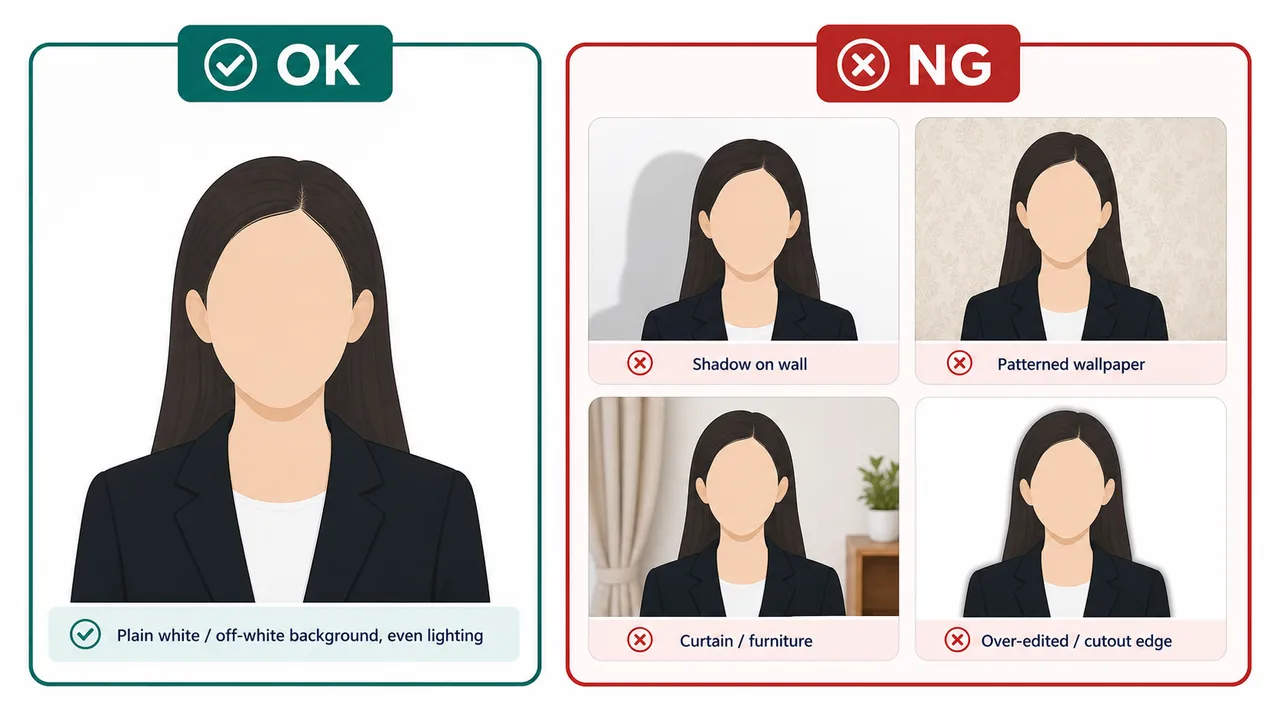
- Plain white or off-white background.
- No shadows, patterns, furniture, curtains, or visible edit edges.
- Avoid heavy digital alteration for the submission photo.
Background basics
The US visa photo background should be plain white or off-white. It should not show wall texture, furniture, curtains, strong shadows, or color casts.
A clean background helps the face and shoulders remain visible. Avoid a white shirt blending into the background so much that the outline becomes unclear.
- Stand a little away from the wall to reduce shadows.
- Use soft light from the front.
- Avoid heavy background replacement or obvious cutout edges.
Fixing background problems safely
If a correction makes the photo look artificial, retake the photo against a better plain wall. Official guidance focuses on a photo taken in front of a proper background, not a heavily altered image.
Requirements and local procedures may change. Use Travel.State.Gov and the instructions for your exact application route as the final reference.
Official requirement note
US visa photos are reviewed by the official online system, embassy, consulate, or other reviewing authority. A correctly prepared file does not guarantee acceptance.
Requirements and local procedures may change. Use Travel.State.Gov and the instructions for your exact application route as the final reference.
FAQ
Can I use a plain wall at home as the background?
Yes, a plain white or off-white wall with even light usually works. Stand a little away from the wall to reduce shadows, and avoid patterns, furniture, and curtains in the frame.
Is background removal or AI correction safe for submission?
Heavy digital alteration can look artificial and is not a substitute for a clean original photo. Prefer retaking the photo against a proper plain background.
Does a clean background guarantee the photo is accepted?
No. Final acceptance is decided by the official online system, embassy, consulate, or other reviewing authority, not by the background alone.
Official sources
- U.S. Department of State - U.S. Visa Photos Checked: 2026-06-29
- U.S. Department of State - Digital Image Requirements Checked: 2026-08-20
- U.S. Department of State - Photo Examples Checked: 2026-06-29
- U.S. Department of State - Photo Composition Template Checked: 2026-06-29
- U.S. Department of State - Photo Frequently Asked Questions Checked: 2026-06-29
- U.S. Department of State - DS-160 Frequently Asked Questions Checked: 2026-06-29
Requirements and local procedures may change. Use Travel.State.Gov and the instructions for your exact application route as the final reference.
Choose a guide
Create your photo in the browser
Prepare the photo for U.S. Visa (DS-160) directly in your smartphone or computer browser. Creating and reviewing are free.
What this tool creates
- the required face photo (for digital upload)
Check background and face position together Open the app page