US VISA PHOTO GUIDE
US visa photo mistakes
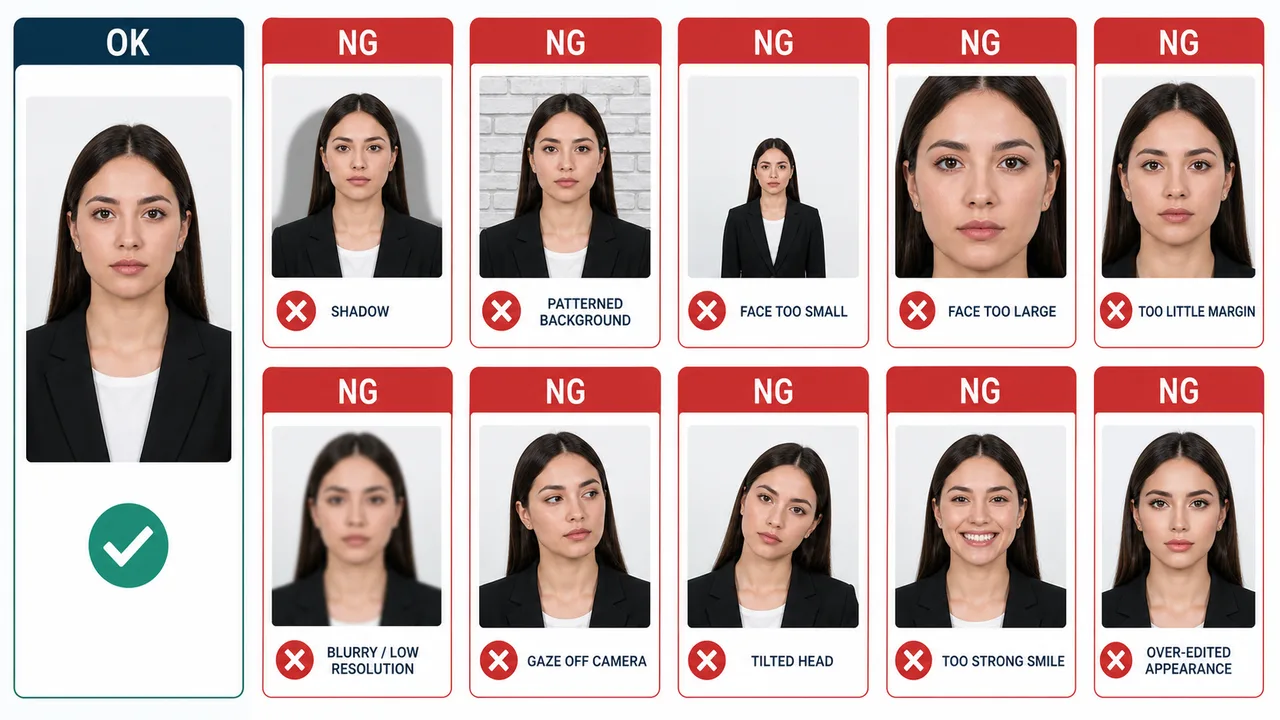
Common NG examples: shadows, patterned backgrounds, wrong face size, blur, low resolution, tilted head, strong smile, and over-editing.
Last checked: June 29, 2026
Quick answer
- Watch for shadows, patterned backgrounds, blur, low resolution, and wrong face size.
- Keep eyes open, head straight, and expression natural.
- Avoid heavy retouching or changes to appearance.
What usually goes wrong
US visa photo mistakes include technical issues and appearance issues. Shadows, patterned backgrounds, blur, low resolution, wrong face size, tilted head, off-camera gaze, and strong expression can all cause problems.
A photo can have the correct pixel size but still be unsuitable if the face is not clear, the background is distracting, or the image has been altered too much.
- Face too small or too large.
- Background shadow or pattern.
- Hair, glasses, hat, glare, blur, or heavy retouching.
Using official examples
Use official examples as the final visual reference. If your photo resembles a listed bad example, retake it rather than trying to force it through with more editing.
US visa photos are reviewed by the official online system, embassy, consulate, or other reviewing authority. A correctly prepared file does not guarantee acceptance.
Official requirement note
US visa photos are reviewed by the official online system, embassy, consulate, or other reviewing authority. A correctly prepared file does not guarantee acceptance.
Requirements and local procedures may change. Use Travel.State.Gov and the instructions for your exact application route as the final reference.
FAQ
What are the most common US visa photo mistakes?
Shadows, patterned backgrounds, blur, low resolution, wrong face size, tilted head, off-camera gaze, strong expression, and heavy retouching are the most common issues.
If my photo looks close to an official bad example, can I fix it with editing?
Retaking the photo is usually safer than heavy editing. Use the official Photo Examples page as the final visual reference.
Where can I compare OK and NG examples?
Check the official Photo Examples page on Travel.State.Gov for the most reliable visual reference for your application route.
Official sources
- U.S. Department of State - U.S. Visa Photos Checked: 2026-06-29
- U.S. Department of State - Digital Image Requirements Checked: 2026-08-20
- U.S. Department of State - Photo Examples Checked: 2026-06-29
- U.S. Department of State - Photo Composition Template Checked: 2026-06-29
- U.S. Department of State - Photo Frequently Asked Questions Checked: 2026-06-29
- U.S. Department of State - DS-160 Frequently Asked Questions Checked: 2026-06-29
Requirements and local procedures may change. Use Travel.State.Gov and the instructions for your exact application route as the final reference.
Choose a guide
Create your photo in the browser
Prepare the photo for U.S. Visa (DS-160) directly in your smartphone or computer browser. Creating and reviewing are free.
What this tool creates
- the required face photo (for digital upload)
Compare your photo before saving Open the app page