US VISA PHOTO GUIDE
Glasses, hair, and hats in US visa photos
What to know about removing glasses, keeping eyes and face outline visible, hair, hats, religious head coverings, and glare.
Last checked: June 29, 2026
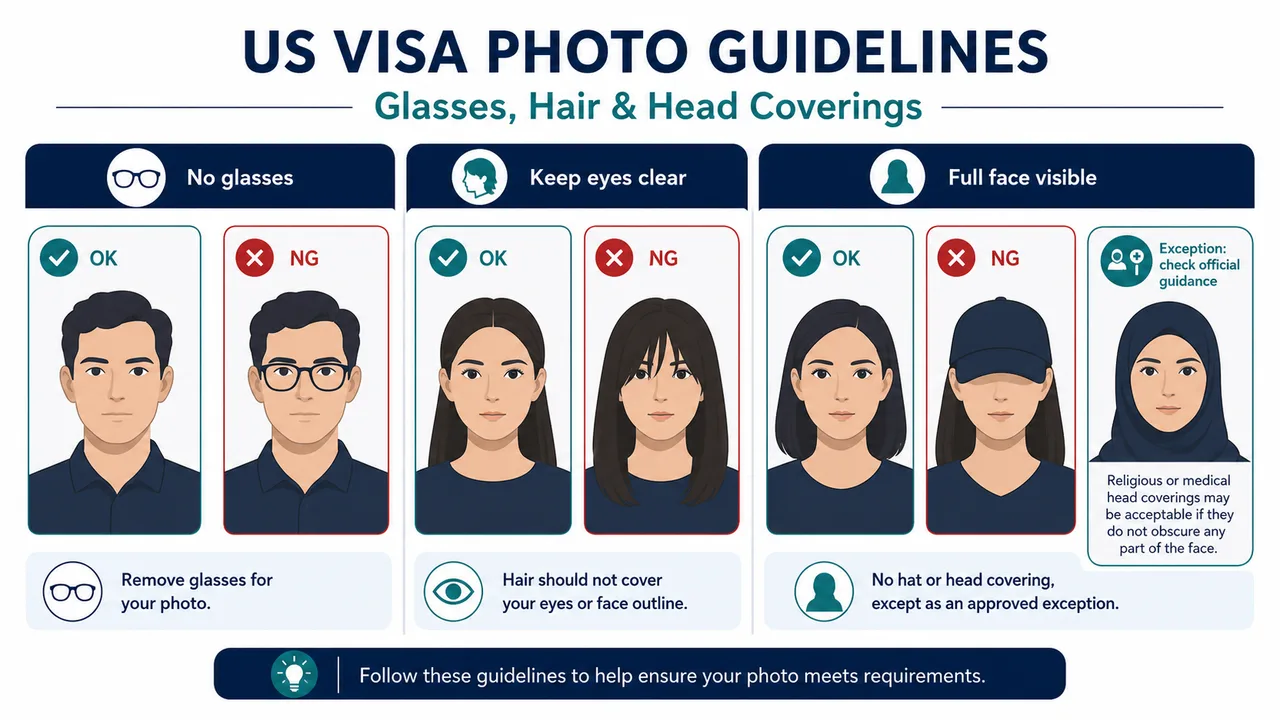
Quick answer
- Glasses are generally not allowed.
- Hair must not cover the eyes or face outline.
- Head coverings must follow official exception rules and show the full face.
Glasses, hair, and head coverings
These details matter because the full face must be visible. Glasses are generally not allowed in US visa photos, and hair should not cover the eyes or obscure the face outline.
Hats and head coverings are generally not allowed unless they meet official exception rules, such as religious use, while still leaving the full face visible.
- Remove glasses before shooting.
- Move hair away from the eyes and face edges.
- Avoid lens glare, hat shadows, and covered facial features.
Religious or medical exceptions
If you rely on a religious or medical exception, read the official wording carefully and prepare supporting documentation if the official process requires it.
Requirements and local procedures may change. Use Travel.State.Gov and the instructions for your exact application route as the final reference.
Official requirement note
US visa photos are reviewed by the official online system, embassy, consulate, or other reviewing authority. A correctly prepared file does not guarantee acceptance.
Requirements and local procedures may change. Use Travel.State.Gov and the instructions for your exact application route as the final reference.
FAQ
Can I wear glasses in a US visa photo?
Glasses are generally not allowed. Check the official Photo FAQ for any medical exception wording and whether documentation is required.
Can I wear a religious head covering?
Religious head coverings may be allowed as an official exception, but the full face must remain visible. Confirm the exact wording on Travel.State.Gov.
Does following these rules guarantee acceptance?
No. These are common preparation points. Final acceptance is decided by the official reviewing authority for your application route.
Official sources
- U.S. Department of State - U.S. Visa Photos Checked: 2026-06-29
- U.S. Department of State - Digital Image Requirements Checked: 2026-08-20
- U.S. Department of State - Photo Examples Checked: 2026-06-29
- U.S. Department of State - Photo Composition Template Checked: 2026-06-29
- U.S. Department of State - Photo Frequently Asked Questions Checked: 2026-06-29
- U.S. Department of State - DS-160 Frequently Asked Questions Checked: 2026-06-29
Requirements and local procedures may change. Use Travel.State.Gov and the instructions for your exact application route as the final reference.
Create your photo in the browser
Prepare the photo for U.S. Visa (DS-160) directly in your smartphone or computer browser. Creating and reviewing are free.
What this tool creates
- the required face photo (for digital upload)
Check eyes, hair, and head covering before exportOpen the app page