US VISA PHOTO GUIDE
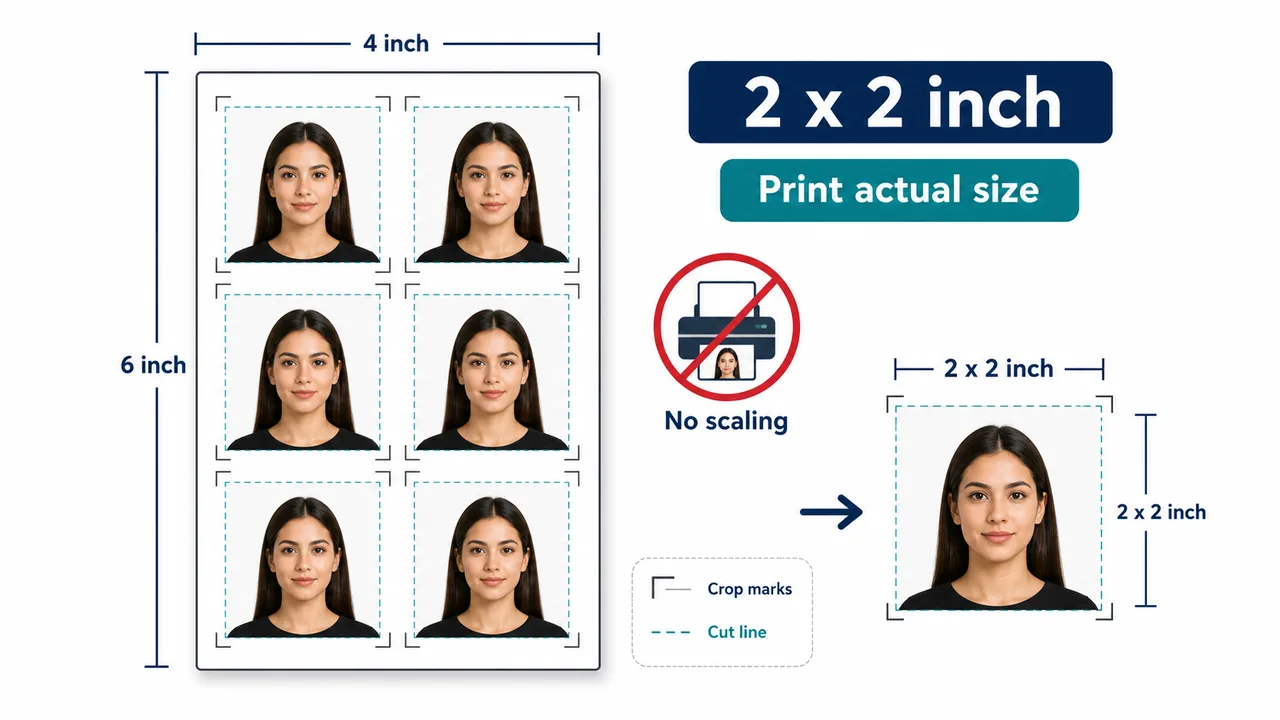
Print a 2 x 2 inch US visa photo
How to prepare printed US visa photos, avoid scaling, cut 2 x 2 inch photos, and separate official rules from print-shop tips.
Last checked: June 29, 2026
Quick answer
- Printed photo size: 2 x 2 inch.
- Print at actual size, no scaling.
- Cut after printing and keep face size unchanged.
Print vs digital upload
A printed US visa photo must measure 2 x 2 inch once cut. The print workflow is different from a DS-160 upload because the physical output size matters.
Use actual-size printing. If the print dialog scales to fit the paper, the face size and 2 x 2 inch square can change even if the digital file looked correct.
- Use photo-quality paper if a printed photo is required.
- Keep crop marks and margins visible before cutting.
- Measure the printed square when possible.
Official rules vs print-shop tips
When placing multiple photos on one sheet, keep each 2 x 2 inch photo at exact size. Convenience-store and home printers may have automatic scaling, border, or paper-size settings that need to be turned off.
Official requirements and print-shop tips are separate: the official rule defines the photo, while the printer settings determine whether the paper output keeps that rule.
Official requirement note
US visa photos are reviewed by the official online system, embassy, consulate, or other reviewing authority. A correctly prepared file does not guarantee acceptance.
Requirements and local procedures may change. Use Travel.State.Gov and the instructions for your exact application route as the final reference.
FAQ
Can I print a US visa photo on L-size photo paper?
You can place a 2 x 2 inch photo on a larger sheet, but print at actual size with no scaling and cut it to exactly 2 x 2 inch afterward. Turn off any auto-fit or border settings.
Does printing at the right size guarantee acceptance?
No. The physical size is one requirement among several. Final acceptance is decided by the official reviewing authority.
Where should I confirm whether a printed photo is required?
Check your embassy, consulate, or application route instructions on Travel.State.Gov, since printed-photo requirements vary by location.
Official sources
- U.S. Department of State - U.S. Visa Photos Checked: 2026-06-29
- U.S. Department of State - Digital Image Requirements Checked: 2026-08-20
- U.S. Department of State - Photo Examples Checked: 2026-06-29
- U.S. Department of State - Photo Composition Template Checked: 2026-06-29
- U.S. Department of State - Photo Frequently Asked Questions Checked: 2026-06-29
- U.S. Department of State - DS-160 Frequently Asked Questions Checked: 2026-06-29
Requirements and local procedures may change. Use Travel.State.Gov and the instructions for your exact application route as the final reference.
Create your photo in the browser
Prepare the photo for U.S. Visa (DS-160) directly in your smartphone or computer browser. Creating and reviewing are free.
What this tool creates
- the required face photo (for digital upload)
Need a 2 x 2 inch print sheet?Open the app page