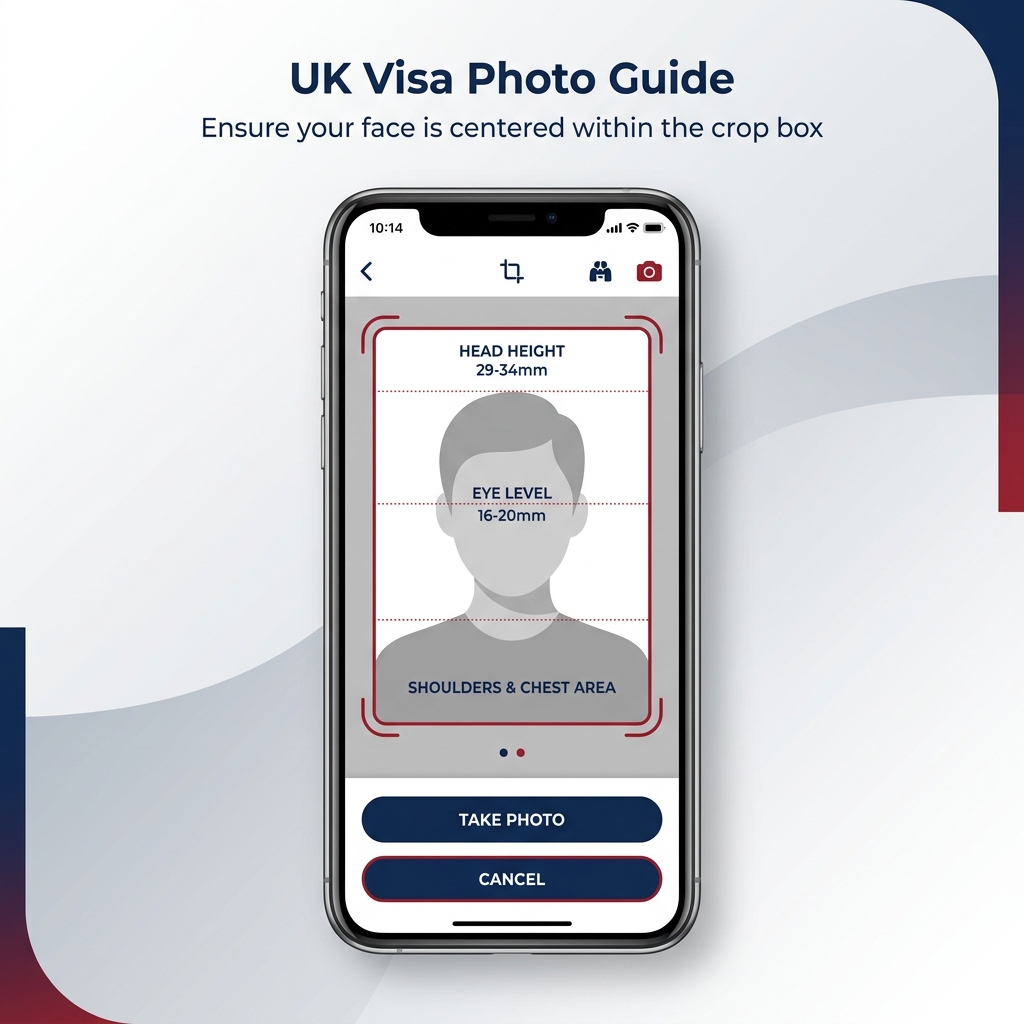
Quick Answer
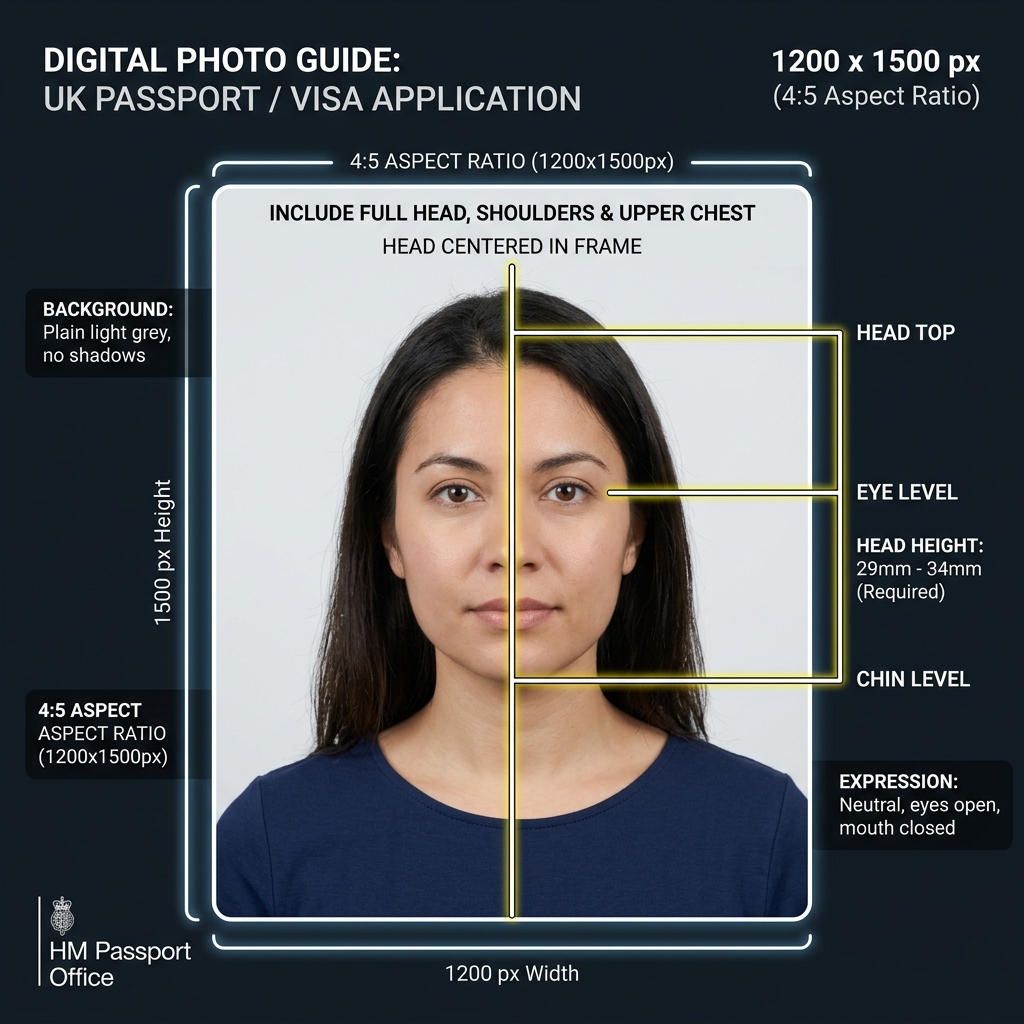
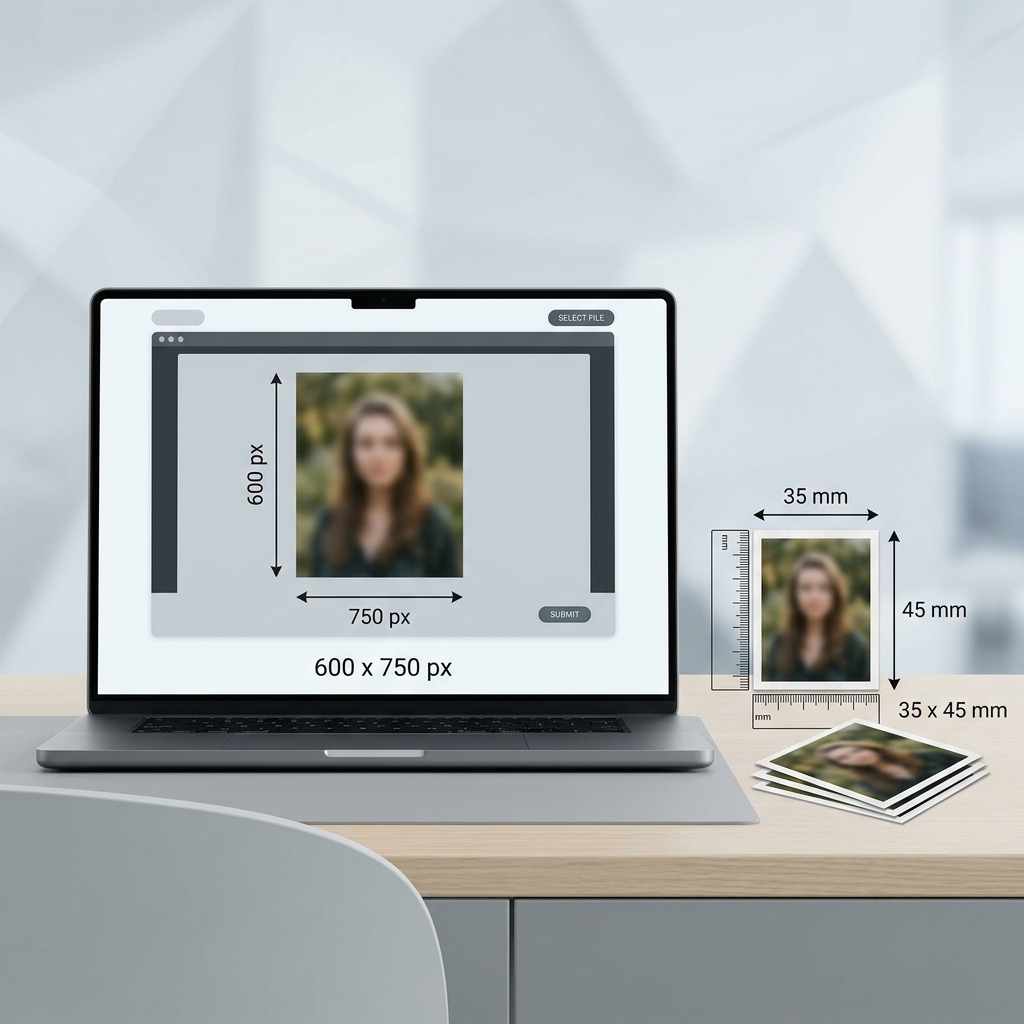
- UK passport and visa applications require a high-quality vertical photo, at least 600×750 pixels (4:5 aspect ratio).
- The photo must include your head, shoulders, and upper body. Do not crop the photo too tightly before uploading, as the official system handles the final crop.
- The background must be plain and light-coloured (light grey or cream, with no shadows or patterns). Digitally altering the background is not permitted.
- This app does not issue HMPO photo codes. It prepares the correct JPEG file for direct online upload.
- This app helps prepare photo files, but it does not submit applications and is not an official UK government service. Check the latest requirements before submitting.
What is a UK Passport & Visa Photo?
A UK passport and visa photo is a standardized vertical photo used for UK passport renewals and UKVI visa applications. For online applications, you upload the JPEG file directly to the GOV.UK portal.
Official Source
Photo regulations are set by UK Visas and Immigration (UKVI) and HM Passport Office. Check the official UK government website (GOV.UK) for final regulations and forms.
Official UK Passport & Visa Photo Requirements Summary
Depending on your application type, you may need a high-quality digital photo file for online upload or physical printed photos. Here is a summary of the official requirements:
| Photo Type | UK passport (digital & print) and UKVI visa (digital) |
|---|---|
| Digital Dimensions | Minimum 600 × 750 px (4:5). This app exports 1200 × 1500 px (product output) |
| Print Size | 45 mm high × 35 mm wide (UK passport print) |
| Background Color | Plain, light-coloured background (light grey or cream, no patterns or shadows). Digitally altering the background is not allowed. |
| Face Position | Face forward, looking straight at the camera, neutral expression, mouth closed |
| Head Size (Print) | 29–34 mm (chin to crown, print route) |
| Expression | Neutral expression, mouth closed, no smiling, eyes open and visible |
| Glasses | Do not wear glasses unless you have to; if you must, no tinted lenses, glare, reflections, shadows, or frames covering your eyes. Removing glasses is the safest option. |
| Head Covering | Allowed only for religious or medical reasons; face must be fully visible |
| File Format | JPG / JPEG (.jpg / .jpeg) |
| File Size | Up to 6 MB (UKVI) / 10 MB (UK passport). No official minimum file size is published |
| Photo Recency | UK passport: within 1 month. UKVI: newly taken (no specific age published) |
UK Visa Photo vs. UK Passport Photo
Although UK visa photos and UK passport photos look very similar, their digital requirements and validation flows can differ. Do not assume they are always identical.
Do Not Reuse Old Passport Photos
UK applications require photos taken within the last month. Reusing older passport photos saved on your device will likely cause rejection.
No Tight Cropping for Digital Uploads
GOV.UK advises against cropping digital photos yourself. The photo file must include your head, shoulders, and upper body with natural margins. The portal will handle the crop.
Photo Code vs. Direct Upload
This app does not issue HMPO photo codes. It is designed for applications where you directly upload the JPEG photo file, which is accepted in most online application flows.
How to Prepare a UK Passport or Visa Photo on Your Phone
Take or select a recent photo with natural, even lighting.
Stand in front of a real, plain, light grey or cream wall (do not use digital background replacements).
Align your face with the on-screen guide in the app.
Adjust the framing to include your head, shoulders, and upper body (do not crop too tightly).
Export the high-quality 1200×1500 px JPEG file to your camera roll.
Directly upload the photo file to the official UK government portal.
Common Mistakes (Reasons for Rejection)
Incorrect photos are the leading cause of UK passport and visa application delays. Avoid these common mistakes:
Using Digitally Altered Backgrounds
Official guidelines require photos to be unaltered by software. Replacing your background digitally will cause rejection. Stand in front of a real wall.
Cropping Too Tightly
Cutting off your hair, chin, or shoulders will make the photo invalid. Keep your head, shoulders, and upper body in the frame. Do not crop the photo yourself — the official system handles the final crop.
Wearing Glasses
Do not wear glasses unless you have to. If worn, any tinted lenses, glare, reflections, shadows, or frames covering the eyes will cause rejection. Removing glasses before taking the photo is the safest option.
Shadows on Face or Background
Strong shadows behind you or on your face will fail automated verification checks. Stand in a well-lit area.
Filters or Excessive Retouching
Any appearance-altering filters, skin-smoothing, or software edits that alter your natural look are strictly forbidden.
Reusing an Old Photo
Using a photo older than 1 month or reusing one from a previous document is easily detected by official validation systems.
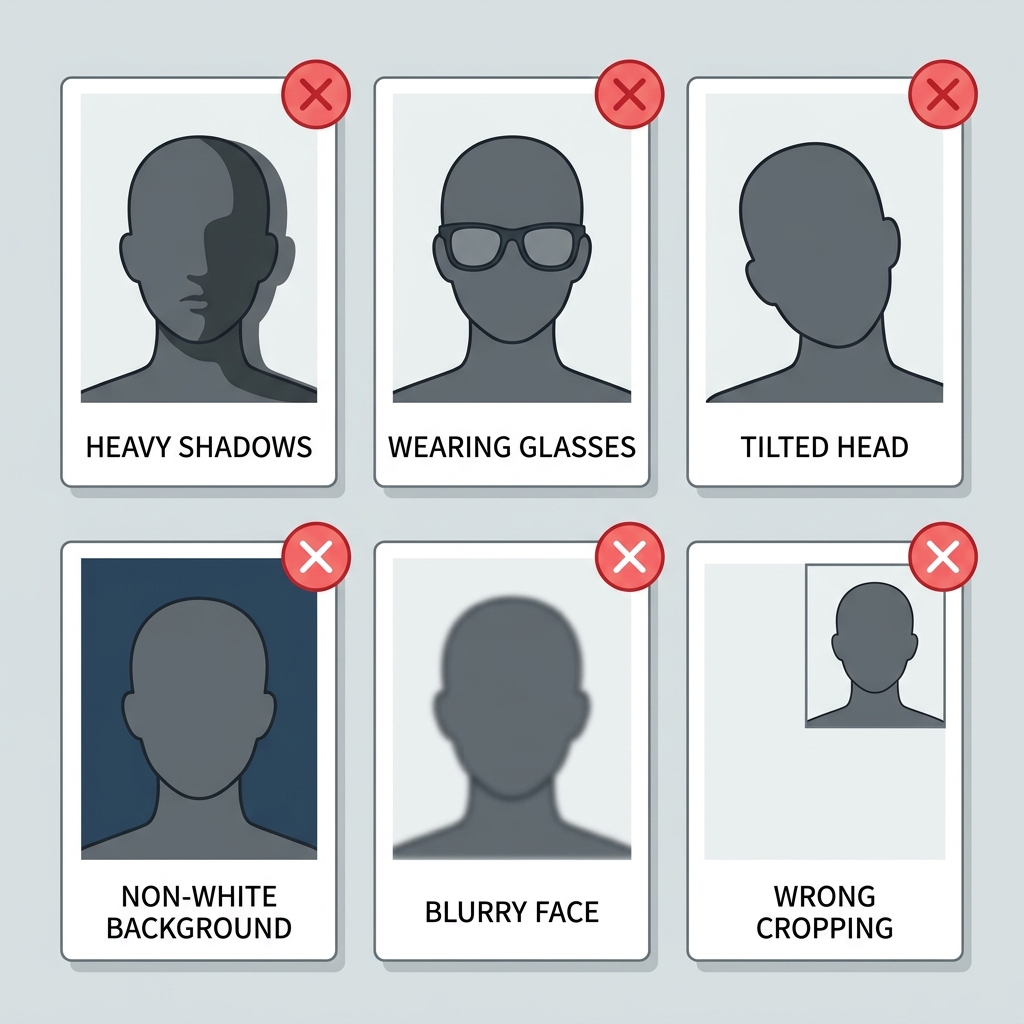
Before you submit
Before saving or submitting your photo, review the most common points of failure.
If you are unsure, you can prepare your photo with the right app while checking these points.
Why Use the UK Passport & Visa Photo App?
Adjust Framing Safely
The app provides visual overlays to align your head, eyes, and shoulders for proper passport-style framing without cutting off essential body areas.
High-Quality 1200×1500 px Output
Export a high-resolution 4:5 aspect ratio JPEG at 1200×1500 px, exceeding the GOV.UK minimum of 600×750 pixels for digital upload.
Strictly Offline & Private
All image adjustments are processed locally on your iPhone. Your personal photos and face data are never uploaded to a server.
No Subscription, Just Simple Utility
Pay only when you are ready to export. No hidden recurring subscriptions, keeping you in full control of your photo preparation.
Note: This app is an independent formatting tool. It does not submit applications and does not issue HMPO photo codes. It does not guarantee acceptance. Always check the latest official requirements on GOV.UK before submitting.
Frequently Asked Questions
What are the UK passport and visa photo requirements?
You need a clear, colour photo taken within the last month against a real, plain light-coloured background (light grey or cream). GOV.UK requires digital photos to be at least 600×750 pixels; this app exports at 1200×1500 px. Printed photos must be 45 mm high by 35 mm wide.
What size should a UK visa or passport photo be?
For digital online uploads, GOV.UK requires at least 600×750 pixels; this app exports a higher-quality 1200×1500 px JPEG. For physical printed submissions, the photo must be exactly 45 mm high by 35 mm wide.
Does this app issue an official UK Photo Code?
No, this app does not issue HMPO photo codes. It generates the digital JPEG photo file that you can directly upload to your online application form on GOV.UK. For photo codes, visit a photo shop that offers the HMPO digital photo code service.
Can I digitally alter the background for my UK photo?
No, GOV.UK guidelines require photos to be unaltered by computer software. Using automatic digital background alteration tools will cause rejection. Take the photo in front of a real, plain, light wall.
Are there different photo rules for children and babies?
Yes, children under 6 do not need to look directly at the camera or have a neutral expression. Babies under 1 do not need to have their eyes open, but no hands, toys, or pacifiers should be visible in the image.
Can I take a UK passport or visa photo with my phone?
Yes, you can use your phone's camera. Ensure you stand against a plain, light grey or cream background, have even lighting with no shadows, and use our app to adjust the framing.
Do I need a printed photo or a digital upload photo?
Most modern UK passport and visa applications are submitted online and require a digital upload. Physical applications require two printed photos. Confirm your specific process on GOV.UK.
Can I wear glasses in a UK passport or visa photo?
Do not wear glasses unless you have to. If you must wear them, they cannot be sunglasses or tinted glasses, and your eyes must be clearly visible with no glare, reflections, shadows, or frames covering the eyes. Removing glasses is the safest option.
What file size is required for a UK photo?
For passport digital uploads, the file size must be up to 10 MB. For UKVI visa uploads, the limit is up to 6 MB. This app optimises files to fit these limits.
What are common reasons a UK photo is rejected?
Common rejection reasons include shadows on the face/background, digitally altering the background, wearing glasses with glare, cropping the head too tightly, or using a photo older than 1 month.
Does this app submit my visa or passport application?
No, this app is a formatting tool only. It helps you prepare the photo file. You must complete and submit your application yourself on the official GOV.UK website.
Is this an official UK visa photo app?
No, this app is not affiliated with HM Passport Office, UK Visas and Immigration (UKVI), or any UK government entity. It is an independent photo preparation utility.
Should I check official requirements before submitting?
Yes, you should always verify the latest official rules on GOV.UK, as immigration policies and online system requirements can change.
Prepare Your UK Passport & Visa Photo
Create a photo file following GOV.UK guidance and export it as a 1200×1500 px JPEG for direct online upload. Does not guarantee acceptance. Always check the latest GOV.UK requirements before submission.
Download on the App Store