PHOTO GUIDE
Background: Plain, light-colored (white, off-white, or light grey)
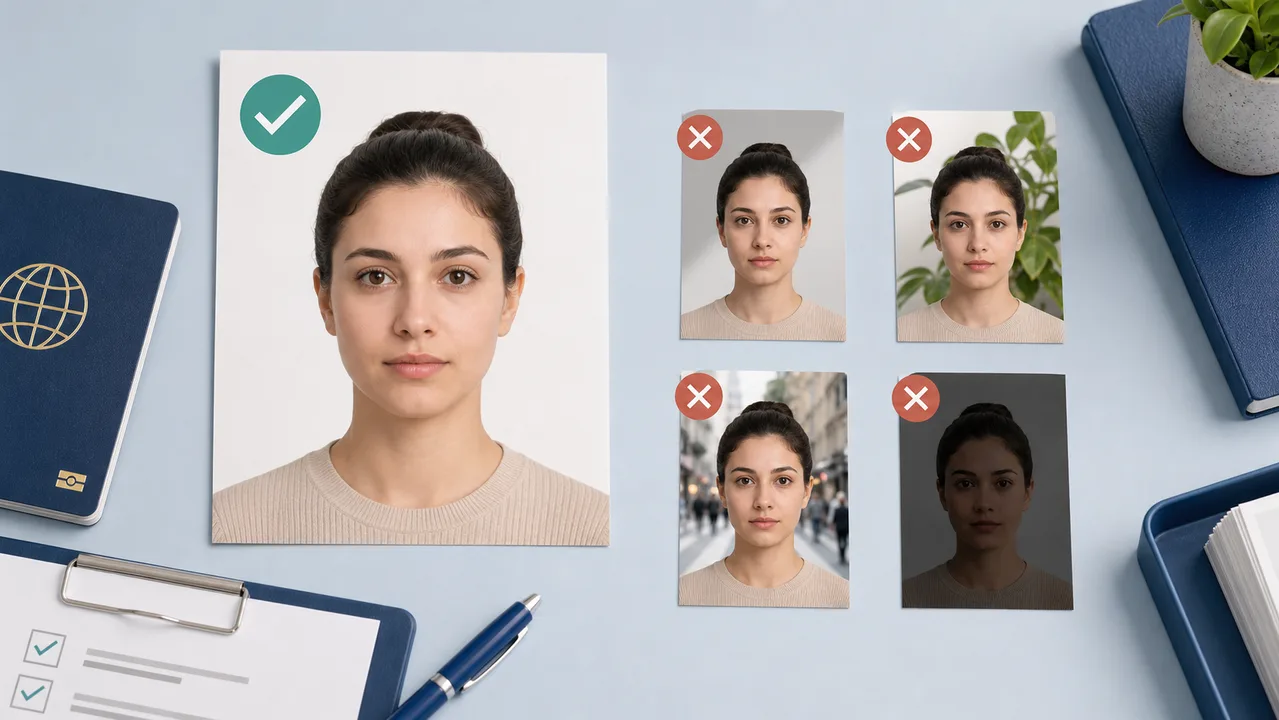
Plain, light-colored (white, off-white, or light grey) Backgrounds with patterns, textures, household objects, or strong color variations. Uneven lighting causing shadows across the face, nose, or background.
Last Updated: June 2026
Quick Answer
- Plain, light-colored (white, off-white, or light grey)
- Backgrounds with patterns, textures, household objects, or strong color variations.
- Uneven lighting causing shadows across the face, nose, or background.
Background: plain, light, and evenly lit
Use a real plain background when possible. A white, off-white, or light grey wall with even lighting is safer than a digital replacement that leaves a cut-out edge around the hair or shoulders.
Stand slightly away from the wall to reduce shadows, and keep furniture, wallpaper texture, and color gradients out of the frame.
- Non-Neutral Background: avoid patterns, textures, household objects, or strong color variations.
- Shadows on Face or Background: uneven lighting can cast shadows across the face, nose, or background.
Follow route-specific background rules when they exist
Official photo guidance commonly checks that the person is clear and that the background does not interfere with identity confirmation. If your visa center publishes a stricter background rule, follow that route-specific instruction rather than a general guideline.
Official Sources First
Always check the specific guidelines from the official embassy, consulate, or authorized visa center (like VFS Global, TLScontact, or BLS International) of your destination country. Requirements may differ based on local submission policies, digital portal specifications, and application location.
shoumei.org helps users prepare photo files based on publicly available requirements. It does not submit visa applications, and it is not an official government service, Schengen authority, embassy, consulate, VFS Global, TLScontact, or BLS International service. Please verify the latest requirements with the official embassy, consulate, or visa application center before submitting.
Common Schengen Visa Photo Mistakes to Avoid
Many visa applications are delayed or rejected due to minor photo errors. Avoid these common mistakes:
Using a size that does not match your application route — for example, a 35 × 45 mm photo where your route requires a different size, or vice versa. The app confirms the size for your route.
Backgrounds with patterns, textures, household objects, or strong color variations.
Uneven lighting causing shadows across the face, nose, or background.
Glare or thick frames obscuring the eyes. Removing glasses is highly recommended.
Why Use the Schengen Visa Photo App?
Align your eyes, head, and chin easily with the interactive overlay guide.
Format your photo to the size confirmed for your application route — commonly 35 × 45 mm, with route-specific sizes such as Finland's 36 × 47 mm or the Spain BLS US tourist 2 × 2 inch where applicable.
Save a 4 × 6 inch or L-size layout formatted for local printing at actual size.
Your personal photo remains securely on your iPhone and is never sent to a server.
Note: shoumei.org is a helper tool to prepare your photo files. It does not submit your visa application and does not guarantee official approval. Always consult the official guidelines from the relevant embassy, consulate, or visa application center.
Frequently Asked Questions
Do Schengen visa photos need a white background?
A white or light grey background is generally required. The background must be completely plain, evenly lit, and free of any shadows, patterns, or objects. Take the photo against a real background rather than replacing it digitally.
Can I adjust the background for my visa photo?
No. Background replacement is not recommended. Take your photo against a plain white, off-white, or light grey background. Digitally replacing the background may result in rejection.
What are common reasons a Schengen visa photo may be rejected?
Common rejection reasons include incorrect dimensions, head too large/small, smiling or frowning, poor lighting/shadows, glasses glare or frames covering eyes, patterned or dark backgrounds, and excessive digital editing.
Should I check official requirements before submitting?
Yes, you should always check the latest photo and submission instructions directly from the embassy, consulate, or visa application center of the country you are applying to.
Official and submission sources
- France-Visas - Photograph quality PDF Checked: 2026-06-30
- Government.nl - Requirements for ID photos Checked: 2026-08-20
shoumei.org helps users prepare photo files based on publicly available requirements. It does not submit visa applications, and it is not an official government service, Schengen authority, embassy, consulate, VFS Global, TLScontact, or BLS International service. Please verify the latest requirements with the official embassy, consulate, or visa application center before submitting.
All guides
Create your photo in the browser
Prepare the photo for Schengen Visa Photo directly in your smartphone or computer browser. Creating and reviewing are free.
The photo specification this tool creates depends on your destination country and application route. Select your route in the tool.
Open the web toolPrepare your Schengen visa photo on your phone Download on the App Store